What Information Does a Client Intake Form Gather?

Fast navigation
You've got a new client inquiry. Great. But now comes the part that either sets you up for a smooth project or weeks of chasing missing details: the intake form.
Here's the thing most people get wrong—they either ask too little and spend the first week ping-ponging emails for basic information, or they ask too much and scare clients off before the relationship even starts.
A good client intake form isn't about collecting data for the sake of it. It's about gathering exactly what you need to serve someone well from day one. No guesswork. No awkward follow-ups. No starting a project only to realize you're missing something critical.
In this guide, we'll break down exactly what information a client intake form should gather, why each piece matters, and how to tailor yours based on your industry.
What Is a Client Intake Form?
A client intake form is a document you send to new clients before you start working together. Its job is simple: collect the key details you need to understand who they are and what they need from you.
Think of it as your first real conversation—just without the back-and-forth.
Instead of spending your first meeting asking for contact details or figuring out their goals, you already have that information. You can skip the basics and get straight to the actual work.
The format doesn't really matter. It could be:
- An online form they fill out in minutes
- A PDF they download and send back
- A simple questionnaire embedded in your website
Why the Right Information Changes Everything
Here's what happens when your intake form asks the wrong questions—or not enough of them.
You start a project thinking you understand the scope. A week in, you realize the client expected something completely different. Now you're backtracking, clarifying, and doing work you didn't plan for.
Or worse—you miss something critical. A detail that seems small at first but turns into a major problem later. A deadline you didn't know about. A condition that changes how you should have approached the whole thing.
This is where most client relationships go sideways. Not because anyone did anything wrong intentionally. But because the right information wasn't collected at the right time.
The right intake form fixes this before it starts.
When you gather the right details upfront, a few things change immediately:
You stop guessing. You know exactly what the client needs, what they expect, and what constraints you're working with. No assumptions. No surprises midway through.
You save time. Instead of five emails asking follow-up questions, you have everything in one place before the first meeting even happens.
You look professional. Clients notice when you're prepared. Walking into a conversation already understanding their situation builds trust faster than anything else.
You protect yourself. Having documented answers about scope, expectations, and agreements gives you something to reference if things get messy later.
The difference between a smooth project and a frustrating one often comes down to the first 24 hours. And most of that depends on what your intake form captured—or missed.
Core Information Every Client Intake Form Should Collect
The specific questions on your intake form will depend on your industry. But certain categories of information are universal—no matter what kind of work you do.
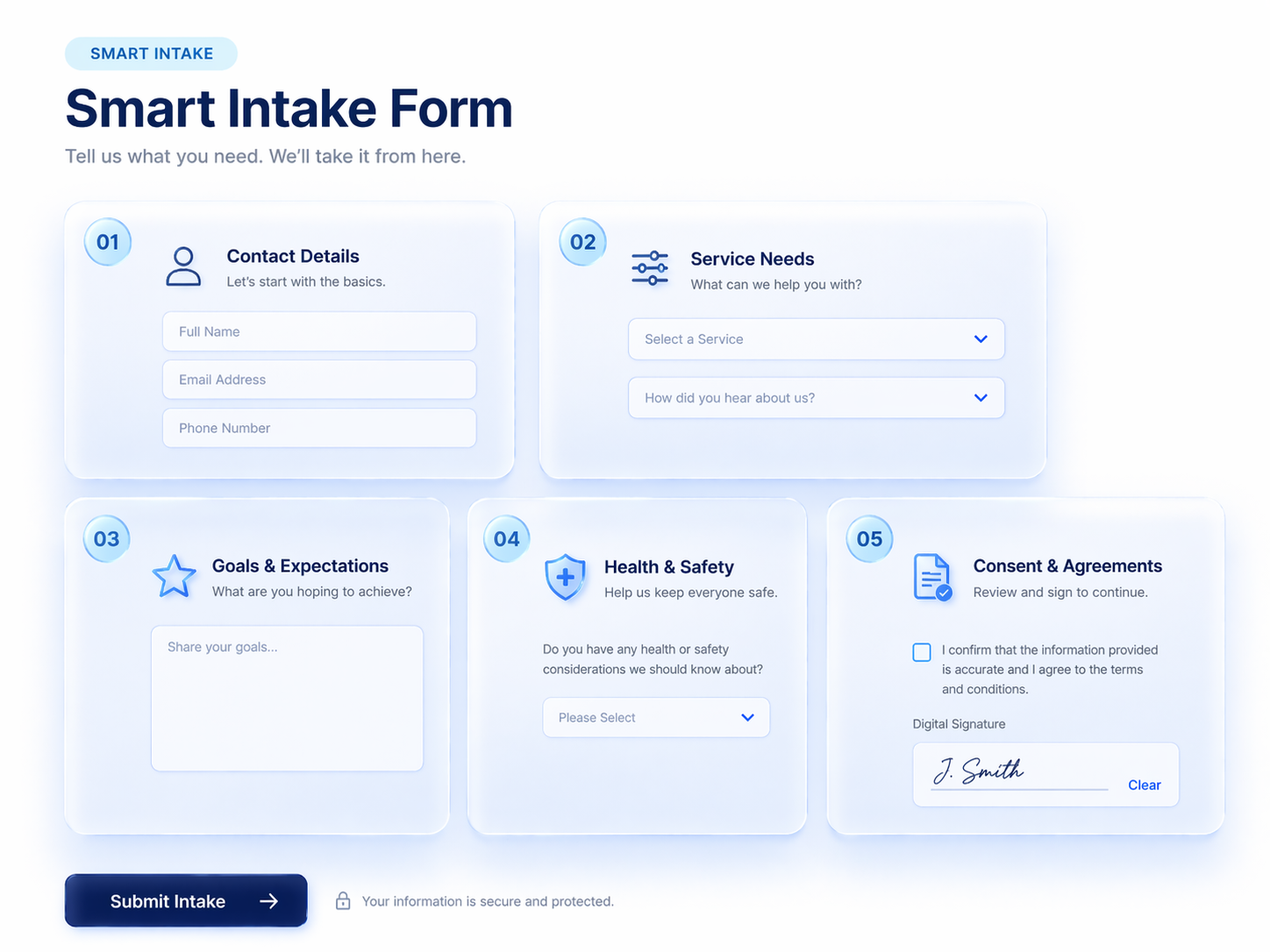
Here's what every solid intake form should cover.
Basic Contact Details
Start with the obvious. You need to know who you're working with and how to reach them.
This includes:
- Full name
- Email address
- Phone number
- Company or organization (if relevant)
- Mailing address (if you need to send anything physical)
Some businesses also ask for a secondary contact or emergency contact, depending on the nature of the work.
This section seems basic, but it matters more than people think. A wrong phone number or outdated email means delays before you even begin. Make these fields required, and consider adding validation so clients can't accidentally skip them or enter incomplete information.
Background and Service Needs
This is where you start understanding what the client actually needs from you.
Ask questions that give you context:
- What's the situation or problem they're dealing with?
- Have they worked with someone in your field before?
- What's their timeline or deadline?
- Are there any constraints you should know about upfront?
The goal here is to walk into the first conversation already informed. You shouldn't be hearing about their core problem for the first time during your initial meeting—you should already know it and be ready to discuss solutions.
The more specific you get here, the less back-and-forth you'll deal with later.
Goals and Expectations
Knowing what someone needs isn't the same as knowing what they expect.
Two clients can come to you with the same problem but have completely different ideas of what success looks like. One wants speed. Another wants perfection. One is flexible on budget. Another has a hard ceiling.
Ask directly:
- What outcome are you hoping for?
- What does success look like for you?
- Are there specific results or deliverables you're expecting?
- What's your budget range? (if relevant)
This section prevents misalignment. When expectations are documented upfront, there's no "I thought you meant something else" conversation three weeks into the project.
Health or Safety Information (When Relevant)
This doesn't apply to every industry—but when it applies, it's critical.
If you work in healthcare, fitness, wellness, beauty, childcare, or any field where physical safety is a factor, you need to collect health-related details.
Examples:
- Medical conditions or diagnoses
- Current medications
- Allergies or sensitivities
- Past injuries or surgeries
- Pregnancy status
- Emergency contact information
Skipping this section in industries where it matters isn't just inconvenient. It's a liability. One allergic reaction or undisclosed condition can lead to serious harm—and serious legal problems.
If health information is relevant to your work, make it a required part of your form. Not optional.
Consent and Agreements
Before work begins, you need documented consent.
This can include:
- Agreement to your terms of service
- Acceptance of your cancellation or refund policy
- Consent to collect and store personal information
- Acknowledgment of liability waivers (where applicable)
- Authorization to proceed with the service
Adding a checkbox or signature field for consent does two things. It protects you legally, and it makes sure the client has actually read and agreed to how you work.
Never assume consent. Always document it.
Industry-Specific Fields You Might Be Missing
The core fields we covered earlier work across the board. But depending on your industry, there's a whole layer of information you might be overlooking—details that seem optional until you're halfway through a project and realize you needed them from day one.
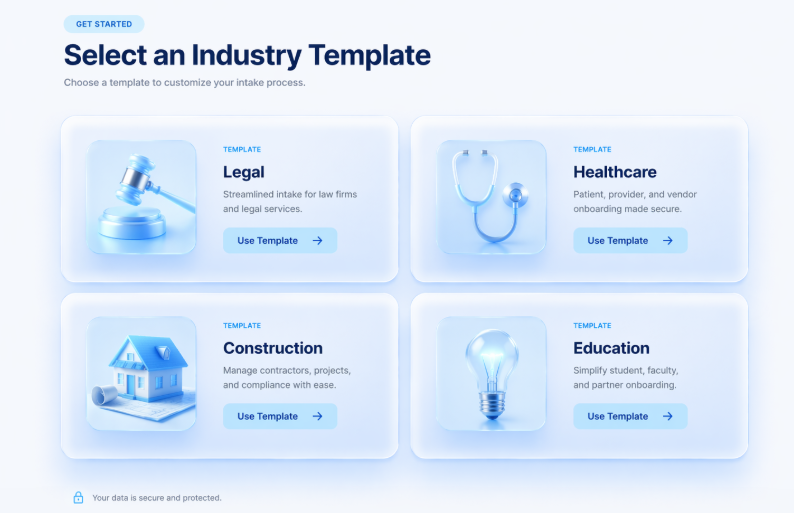
Here's what to consider adding based on your field.
Legal Services
Legal intake forms need to go beyond basic contact details. You're not just collecting information—you're evaluating whether you can take the case at all. Conflict of interest checks are non-negotiable, and missing key dates or opposing party names can create serious problems later.
Fields to include:
- Type of legal matter (family, criminal, business, personal injury, etc.)
- Brief description of the legal issue
- Key dates and deadlines related to the case
- Names of other parties involved (for conflict checks)
- Prior legal representation on this matter
- How the issue arose and relevant timeline
- Preferred communication method
- Referral source
Healthcare and Wellness
If you're in healthcare, therapy, fitness, or any wellness-related field, your intake form has to cover medical history thoroughly. An undisclosed allergy or missed medication interaction isn't just inconvenient—it's a liability. And without proper consent documentation, you're exposed legally.
Fields to include:
- Current medications and dosages
- Known allergies and sensitivities
- Past surgeries or hospitalizations
- Family medical history
- Current symptoms or health concerns
- Emergency contact information
- Insurance provider and policy details
- Consent for treatment and HIPAA acknowledgment
Construction and Real Estate
Whether you're a contractor or real estate agent, your intake form needs project-specific details that generic forms completely miss. Knowing budget range, timeline, and decision-makers upfront prevents scope creep and wasted time on unqualified leads.
Fields to include:
- Property address and site access details
- Type of project (new build, renovation, buying, selling)
- Project scope or property requirements
- Budget range or price expectations
- Financing status (for buyers)
- Desired timeline and hard deadlines
- Decision-maker contact information
- Permits or approvals already in place (for construction)
Education
Schools, tutoring services, and online course providers need intake forms tailored to the learning context. Understanding a student's strengths, challenges, and goals before the first session lets you show up prepared—not spending half the time figuring out where to start.
Fields to include:
- Student name and age/grade level
- Parent or guardian contact (for minors)
- School currently attending
- Subjects or skills needing support
- Learning goals and expected outcomes
- Known learning challenges or accommodations
- Preferred learning style
- Availability and scheduling preferences
Common Mistakes That Cost You Time (and Clients)
Most intake form problems don't come from asking the wrong questions. They come from how the form is built, when it's sent, or what happens after it's submitted.
Here are the mistakes that quietly sabotage your process—and how to avoid them.
Making the form too long
If your form takes more than a few minutes to complete, people will abandon it. You don't need their entire life story upfront. You need enough to get started. Ask for the essentials now, and gather the rest once they're actually committed.
Asking questions you'll never use
Every field should have a purpose. If you're collecting information that sits untouched in your system, you're wasting your client's time—and they'll notice. Before adding a question, ask yourself: will I actually do something with this answer?
Using confusing or technical language
Your clients aren't experts in your field. If they were, they wouldn't need you. Avoid jargon, keep questions simple, and write like you're talking to a real person. Confusion leads to incomplete answers or form abandonment.
Sending it at the wrong time
Too early, and it feels like homework before they've even decided to work with you. Too late, and you're scrambling to collect details during the first meeting. The sweet spot is right after they've committed but before the work begins.
Ignoring mobile users
Most people will fill out your form on their phone. If it's clunky, hard to tap, or doesn't display properly on a small screen, completion rates drop fast. Always test your form on mobile before sending it to anyone.
Skipping required fields on critical questions
If a question matters, make it required. Otherwise, clients skip it—and you end up chasing the information anyway. Don't assume people will fill out everything just because you asked nicely.
Never updating the form
Your services change. Your process evolves. But if your intake form stays the same for years, it stops reflecting how you actually work. Review it regularly and update questions that no longer make sense.
Not following up on incomplete submissions
Someone starts your form but doesn't finish. What happens next? If the answer is "nothing," you're losing potential clients. A simple reminder email can recover submissions that would otherwise disappear.
FAQs
What does a client intake form do?
A client intake form collects essential information about new clients before work begins. It captures contact details, service needs, goals, and any relevant background to help you prepare properly.
What are intake forms used for?
Intake forms are used to streamline onboarding, qualify leads, understand client needs, document consent, and ensure you have everything required to deliver your service effectively from day one.
When should a client fill out an intake form?
Clients should complete the intake form after they've agreed to work with you but before the first meeting or session. This timing ensures you're fully prepared when work begins.
Who fills out an intake form?
The client fills out the intake form. For minors or dependents, a parent or legal guardian completes it. In business contexts, the primary decision-maker or project lead typically handles it.
Why is a client intake form necessary?
An intake form eliminates guesswork, reduces back-and-forth communication, protects you legally with documented consent, and ensures no critical information slips through the cracks before starting work.