
No Code Automation Platform: no code automation platform, simplified
A no-code automation platform is a game-changer that lets you connect all your business tools and build automated workflows using simple, drag-and-drop visuals. You get to skip the complex code and link up your apps to handle all those repetitive tasks—think data entry, approvals, and notifications—without ever needing to call a developer. It's like having a set of digital LEGOs for your business processes.
What Is a No Code Automation Platform
Picture this: you need a new business process built the old-fashioned way. First, you write a detailed spec sheet. Then, you hand it over to the IT team, wait for them to code it, test it, and finally, deploy it. That whole cycle can easily eat up weeks, sometimes even months.
A no-code automation platform completely flips that model on its head.
It gives you a visual canvas where the people who actually get the business problem—your marketing managers, operations pros, or HR team—can build the fix themselves. Think of it like a digital flowchart. You set a trigger (like, "when a new form is submitted") and then just map out what happens next ("create a new customer in the CRM," "send a welcome email," and "ping the sales team in Slack").
From Manual Tasks to Intelligent Workflows
But these platforms aren't just for straight-line, simple tasks. They let you build out sophisticated, multi-step workflows that have real business logic baked in. This is a huge difference between a basic workflow and a true business process. You can dive deeper into what sets them apart in our guide on workflow vs. business process.
A no-code platform lets you create rules that do the thinking for you, like:
- Conditional Logic: "If this expense report is over $500, send it to a manager. Otherwise, approve it automatically."
- Data Routing: "When a lead comes in from a big company, assign it to a senior sales rep."
- Scheduled Actions: "Send out a report of all open support tickets every Friday at 5 PM."
This approach puts the power back into the hands of your team, creating what folks are calling "citizen developers." These are your non-technical employees who can now solve their own department's headaches, which means you can innovate faster and take a massive load off your IT department.
The core idea is simple but incredibly powerful: empower the experts in your business to build the tools they actually need. It shifts solution-building from a slow, centralized IT function to a fast, business-led one.
And the demand for this kind of power is blowing up. The no-code development platform market leaped from USD 28.11 billion to USD 35.86 billion in a single year—that's a massive 27.6% growth rate. With businesses desperate to clear IT backlogs and embrace hyper-automation, the market is on track to hit USD 93.92 billion by 2029. You can dig into the full market growth trends and drivers on prlog.org.
At the end of the day, a no-code automation platform acts as the central nervous system for your business. It connects all your different apps, making sure information flows exactly where it needs to, all without you having to write a single line of code.
The Core Features That Power Your Automation
A no-code automation platform is so much more than a simple task manager; think of it as a powerful engine for your entire business. To really get what it's capable of, you need to look under the hood at the core features that make everything tick. These are the components that work together to turn messy, complex processes into simple, automated workflows that just run.
This map shows how everyday team members—or "citizen developers"—can use visual tools to build the solutions they need.
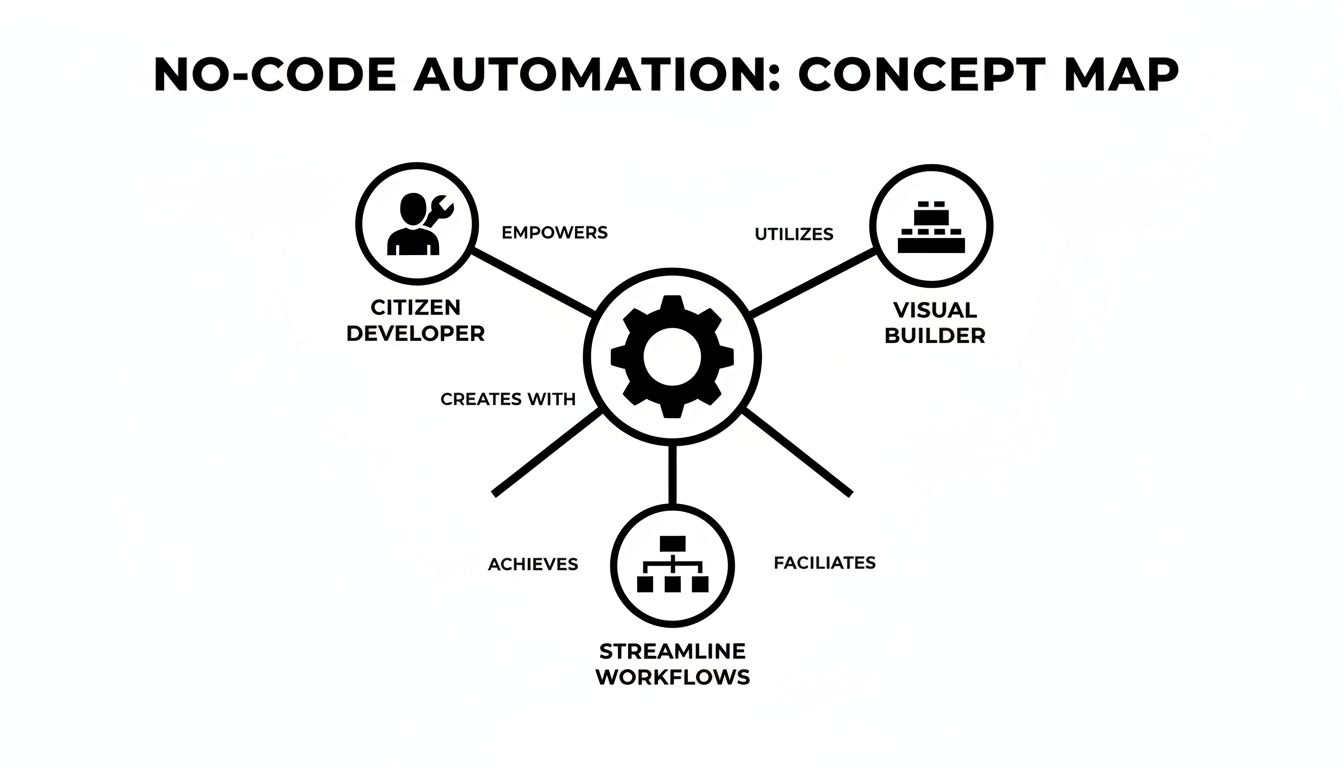
The real magic here is empowering your team to solve their own problems, cutting out the long waits for traditional development. Let's break down the key features that make this a reality.
To give you a quick overview, here’s a look at the essential features you should expect from any solid no-code automation platform and the problems they solve.
Essential Features of a No Code Automation Platform
| Feature | What It Does | Business Benefit |
|---|---|---|
| Visual Workflow Builder | Lets you map out processes with drag-and-drop blocks. | Makes automation accessible to non-technical users, speeding up creation. |
| Conditional Logic | Creates "if-this-then-that" rules to handle different scenarios. | Builds smarter, more flexible workflows that adapt to real-world data. |
| App Integrations | Connects hundreds of third-party apps to share data. | Breaks down data silos and creates a single, unified system. |
| E-Signatures & Payments | Handles legally binding signatures and transactions within workflows. | Closes deals and gets you paid faster, all in one seamless process. |
| Document Parsing | Extracts data from files like PDFs and invoices. | Eliminates manual data entry from documents, saving time and reducing errors. |
| Analytics & Reporting | Tracks workflow performance, volume, and bottlenecks. | Provides clear data to measure ROI and continuously improve processes. |
These features are the building blocks of efficient automation. Now, let’s dive a bit deeper into what each one actually does for you.
The Visual Workflow Builder
The heart of any no-code platform is its drag-and-drop workflow builder. Think of it like a digital whiteboard where you can map out your business process visually, just like a flowchart. Instead of writing lines of code, you connect pre-built blocks that represent triggers (what starts the process) and actions (what happens next).
For instance, a new sales lead filling out your website form could trigger a whole sequence:
- First, a new contact is created in your CRM.
- Then, the lead is added to your "New Leads" email list.
- Finally, a notification pings the sales team in Slack.
This visual approach makes building workflows intuitive for everyone, not just the developers. It puts the power in the hands of the people who know the process inside and out.
Smart Rules with Conditional Logic
This is where your automations start to get really intelligent. Conditional logic is the "if-this-then-that" brainpower that lets your workflows make decisions on their own. You can set up rules that send the automation down different paths based on specific criteria.
Imagine an invoice approval process. With conditional logic, you can set a rule: "If the invoice is over $5,000, send it to the finance director. If not, route it straight to the department manager." This simple rule turns a rigid process into a dynamic system that adapts to the data it's given. Platforms like Supatool make setting up this kind of logic as easy as filling out a form.
Seamless App Integrations
Your business doesn’t run on a single app. You've got a whole suite of tools for CRM, marketing, communication, and everything in between. A top-tier no-code automation platform acts as a universal translator, connecting these separate systems so they can finally talk to each other.
With a huge library of integrations, you can move data between your apps without lifting a finger. This is a game-changer for getting rid of manual data entry and all the human errors that come with it. If you want to dig deeper, check out our guide on automated data integration.
A platform's true value isn't just what it does alone, but how well it connects the tools you already use every day. The goal is to create one unified system where information flows freely, kicking off actions across your entire tech stack.
E-Signatures and Payments
So many business processes end with a signature or a payment. The best platforms bring these critical final steps right into the automated workflow. You can automatically generate a contract from form data and send it off for a legally binding e-signature without ever leaving the system.
In the same way, you can integrate payment gateways like Stripe or PayPal to collect payments for orders or subscriptions as a natural part of the process. It creates a smooth, professional experience for your customers and ensures you get paid on time.
Document Parsing and Data Extraction
A ton of important information is still trapped in documents like PDFs and invoices. A key feature for modern automation is the ability to handle this unstructured data. By mastering PDF parsing, you can automatically pull information from these files and turn it into structured data your workflows can use. This is perfect for automating things like invoice processing or digitizing scanned forms.
Analytics and Reporting
Finally, how do you know if any of this is actually working? That’s where built-in analytics comes in. These dashboards give you a real-time look at how your processes are performing.
You can easily track key metrics like:
- Cycle Time: How long a process takes from start to finish.
- Volume: How many times a workflow has run.
- Bottlenecks: Where things are getting stuck or delayed.
This data is crucial for measuring your return on investment and finding opportunities to make your automations even better.
How Different Teams Can Win with Automation
Knowing the features of a no-code automation platform is one thing, but seeing it in action? That’s where the magic really happens. Automation isn't some rigid, one-size-fits-all fix. It’s more like a set of powerful building blocks that every department can use to solve their own unique, day-to-day headaches.
From helping sales reps close deals faster to giving new hires a warm welcome, no-code workflows completely change how teams get things done. Let's dig into some real-world examples of how Sales, Marketing, HR, and Operations teams are using these platforms to see actual results.
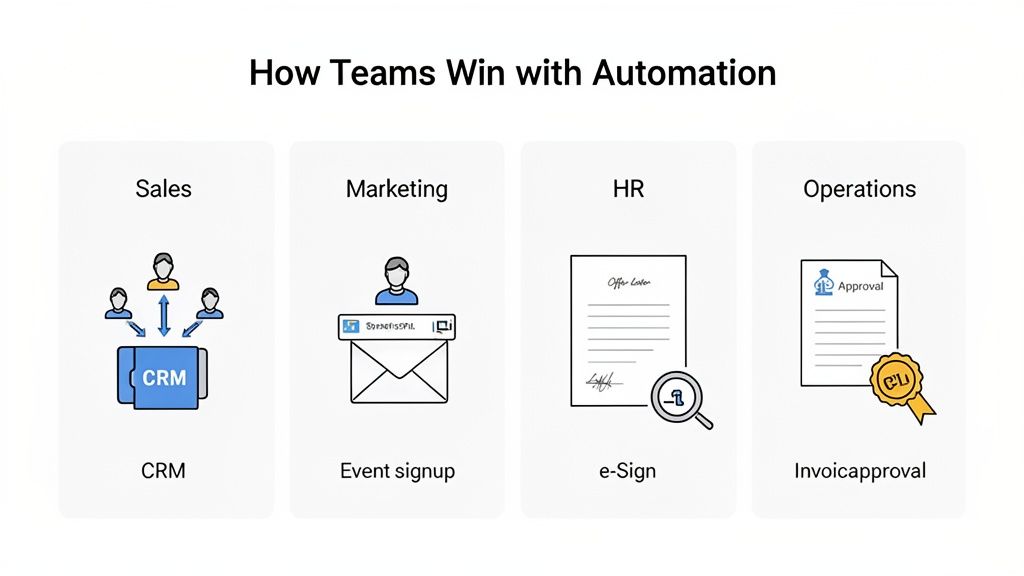
Sales Teams Close Deals Faster
For any sales team, speed is the name of the game. Every minute you waste on follow-up is a minute the competition can use to sneak in. A huge bottleneck is often the simple—but slow—process of getting new leads from a form into the hands of the right salesperson.
The Problem: Leads were coming in through a website form, but someone had to manually copy-paste that info into the CRM. This could take hours. By the time a sales rep finally reached out, the once-hot lead was already lukewarm.
The Automated Solution:
- A new form submission instantly kicks off the workflow.
- The platform automatically pulls in extra data to enrich the lead with company info.
- Conditional logic immediately routes the lead to the correct rep based on territory or company size.
- A new lead record is created in the CRM, and the assigned rep gets a ping on Slack.
- At the same time, the lead gets a personalized welcome email, starting the conversation.
This whole sequence unfolds in seconds. No lead ever gets lost in a spreadsheet again, and the sales team can spend their time actually selling.
Marketing Teams Streamline Engagement
Marketers are constantly juggling campaigns, events, and webinars. A single event can create a mountain of manual work—exporting registration lists, sending reminders, and distributing follow-up materials. It's a recipe for burnout and mistakes.
The Problem: Managing webinar registrations was a logistical nightmare. The team was stuck manually exporting attendee lists, importing them into their email tool, and then sending out every reminder and resource by hand.
An automated workflow turns a multi-step, error-prone manual process into a single, reliable system that runs on its own. It's the difference between herding cats and having a perfectly trained sheepdog.
The Automated Solution:
- A prospect signs up for a webinar using a simple Supatool form.
- The workflow instantly adds their details to a "Webinar Attendees" list in the marketing platform.
- A series of reminder emails are automatically scheduled and sent leading up to the event.
- After it’s over, the system sends a thank-you email with a link to the recording and a quick feedback survey.
This automation doesn't just save hours of tedious work; it also delivers a polished, professional experience for every single attendee, boosting both engagement and your brand's reputation.
HR Creates Seamless Onboarding
The HR department handles one of the most important processes in any company: bringing new people on board. A clunky, disorganized onboarding experience can make a new hire feel confused and undervalued right from the start.
The Problem: The onboarding process was a mess of disconnected emails, spreadsheets, and paper forms. Key steps were constantly being missed, from sending the official offer letter to setting up IT accounts and scheduling orientation.
The Automated Solution:
- Offer Letter: As soon as a candidate is marked "hired" in the hiring system, an offer letter is automatically generated and sent out for an e-signature.
- Account Creation: Once the offer is signed, tickets are automatically created for the IT team to set up email and other system accounts.
- Onboarding Schedule: The new hire receives a welcome email with their first-week schedule, and orientation meetings are automatically added to their calendar.
This guarantees every new employee gets the same organized, high-quality welcome, setting them up for success from day one.
Operations Manages Approvals with Ease
Operations teams are the engine of a company, keeping everything running smoothly, from expense reports to supplier invoices. These tasks often require sign-off from multiple people, and if managed by email, they can quickly turn into a major bottleneck.
The Problem: Expense approvals were all done through email. An employee would send receipts to their manager, who might forget to respond, leading to late reimbursements and unhappy team members.
The Automated Solution:
- An employee submits their expenses through a standard digital form.
- The workflow uses conditional logic: if the amount is under $200, it's approved automatically.
- If it's over $200, the request is routed to their direct manager for approval.
- Once approved, the finance team gets a notification to process the reimbursement, and the employee is updated on the status.
By using a no-code automation platform, the ops team creates a clear, trackable approval process for every request, which slashes turnaround times and kills the need for manual follow-ups.
The Strategic Business Impact of Going No Code
Bringing a no-code automation platform into your business is more than just a quick efficiency boost for your teams. It's a fundamental shift in how your company operates, building a more nimble, resilient, and forward-thinking organization. Sure, saving time on daily tasks is a great start, but the real magic happens at a higher level.
This change breaks you free from the old-school chains of software development. Instead of projects getting stuck for months in an overloaded IT queue, your business experts can step up and build the solutions they need themselves. They're on the front lines, so they can tackle operational headaches the moment they pop up. This kind of self-sufficiency just makes everything move faster.
Slashing Costs and Development Timelines
The first thing you’ll notice—right on your bottom line—is the cost savings. Traditional software development is a slow, expensive beast. It’s a huge investment in developer salaries, project management overhead, and endless testing cycles. A no-code approach takes a sledgehammer to those costs.
By giving your existing team the power to build their own tools, you cut down your reliance on highly paid, specialized developers. It’s not just about saving on direct development costs, either. This frees up your IT department to focus on the big, mission-critical infrastructure projects instead of getting bogged down building small workflows for every other department.
Adopting no-code isn't just about doing things faster; it's about fundamentally changing who can create value. When anyone on the team can build a solution, you unlock a level of innovation that was previously impossible.
The numbers don't lie. Today, about 65% of new applications are being built without a single line of traditional code. These no-code solutions are delivering a staggering 362% return on investment and letting teams launch apps 90% faster. Microsoft even predicts that out of the next 500 million apps built, a mind-blowing 450 million will use no-code or low-code tools. If you want to dig deeper into these numbers, you can check out the full findings on no-code development statistics on index.dev.
Fostering a Culture of Innovation
Something really powerful happens when you empower employees to solve their own problems. Instead of just accepting clunky, inefficient processes as "the way things are," people start looking for ways to make things better. A no-code automation platform gives them the tools to turn those ideas into reality, right away.
It kicks off a fantastic cycle:
- An employee spots a recurring problem or a bottleneck that’s slowing everyone down.
- They hop on the platform and quickly build an automated workflow to fix it.
- The new solution saves time, cuts down on frustration, and inspires their colleagues to start looking for their own fixes.
This kind of grassroots innovation makes your whole organization incredibly adaptable. When the market shifts or a new opportunity appears, your team can build and launch the processes needed to respond in days, not months. That gives you a serious leg up on slower competitors.
Enhancing Operational Resilience and Compliance
Let's be honest, manual processes are fragile. They depend on someone remembering to do something, they're wide open to human error, and they create massive bottlenecks if a key person is out sick. A no-code automation platform swaps that fragility for solid, standardized, and fully traceable digital workflows.
This pays off in two major ways. First, you get better operational resilience. When a process is automated, it runs the exact same way every single time. It doesn't get tired, it doesn't make typos. This smooths out your operations and keeps the business running, even when things get hectic or you're short-staffed.
Second, it tightens up compliance. Every single action in an automated workflow is logged, creating a perfect, unchangeable digital audit trail. For any business in a regulated industry, this is gold. It makes it incredibly simple to prove that you followed the proper procedures for every single transaction, approval, or client interaction.
Choosing and Implementing the Right Platform
Jumping into the world of automation can feel like a huge leap, but picking and launching a no-code platform is probably more straightforward than you think. The trick is to have a clear plan. Focus first on finding the right fit for your business, then roll it out with a smart, step-by-step approach.
Think of it like hiring a new team member. You need to make sure they have the right skills and can grow with your company. To do that, you'll want to start by looking at the core components that will make or break your long-term success.
Key Criteria for Your Evaluation
Before you sign on the dotted line, you need to put potential platforms under the microscope. Each of these benchmarks is crucial for making sure the tool can handle what you need today—and what you'll need tomorrow.
- Integration Library Depth: How many apps does it actually connect with? More importantly, are they the ones your business uses every single day? A platform's real value is tied directly to how well it "talks" to your existing tech stack.
- Scalability: Can the platform keep up as your business grows? You need a solution that won’t start to creak and groan when your user base or transaction numbers shoot up.
- Security and Compliance: Does it have enterprise-grade security like data encryption and user access controls? You absolutely have to ensure it meets industry standards to protect your company and customer data.
- Customer Support: When you inevitably hit a snag, how fast and helpful is their support team? Good support can be the difference between a minor hiccup and a full-blown operational meltdown.
When you're looking at different options, checking out lists of the best document automation software tools can give you a better feel for specific features, especially if your workflows are heavy on contracts, invoices, or reports.
Your Simple Implementation Framework
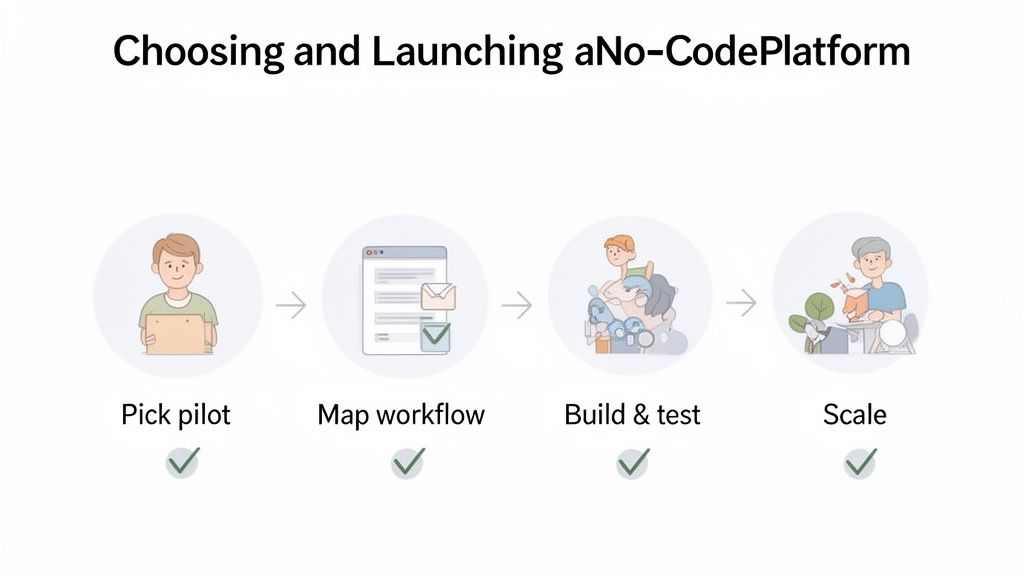
Once you've picked a platform, fight the urge to automate everything all at once. The best strategy is to start small, prove the value, and then expand. This approach builds momentum and gets your team comfortable with a new way of working.
Start with a single, high-impact, low-complexity process. Pick a workflow that's famously repetitive and frustrating for your team but isn't mission-critical. This gives you a safe space to learn and gets you a quick win to celebrate.
Here’s a simple roadmap for your first project:
- Identify and Map the Process: Choose your pilot project—something like expense approvals or new lead notifications. Before you build a single thing, map out every step of the current process on a whiteboard. Our guide offers a complete roadmap for workflow analysis to get you started.
- Build and Test: Use your new platform’s drag-and-drop builder to recreate the workflow. Tools like Supatool often have pre-built templates that make this step incredibly fast. Run a few tests with a small group of users to iron out any kinks.
- Launch and Celebrate: Once you’re confident it works, roll it out to the whole team. Make sure to highlight the time saved and headaches eliminated. This celebration is key—it builds excitement for whatever you automate next.
The no-code AI platform space is one of the fastest-growing corners of the market, valued at USD 4.06 billion and expected to climb to USD 10.43 billion by 2030. A lot of that growth is coming from small and medium-sized businesses who see these platforms as a cost-effective way to get powerful tools without hiring expensive developers. You can learn more about this trend and discover the full market research on Mordor Intelligence.
Alright, let’s get down to it. You’ve set up a slick new automated workflow, and things feel faster. But how do you prove it’s actually working? To show the real muscle behind a no-code automation platform, you have to go beyond gut feelings and look at the hard numbers—the key performance indicators (KPIs) that really matter to the business.
This isn’t about just saying a process is "quicker." It's about asking, "How much quicker, and what is that speed actually worth to us?" A data-driven approach is the only way to build a solid case for doing more of this and showing a real return on your investment.
Think of it like this: if you upgrade your car's engine, you don't just say it "drives better." You measure its new top speed, its better fuel efficiency, and its 0-60 time. We need to do the same thing for our business processes.
Key Metrics for Automation ROI
To get a clear picture of your success, I recommend focusing on three core metrics. These KPIs are easy to grasp and connect directly to business value, which makes them perfect for sharing with your boss or other stakeholders.
Most of the top platforms, including Supatool, come with built-in analytics dashboards that track these for you right out of the box.
Here are the big three to keep an eye on:
- Process Cycle Time: This is the total time it takes for a task to get done, from start to finish. For example, how long did it take to get an invoice paid from the moment you received it before automation versus after? A drop here is a direct win for operational speed.
- Error Rate Reduction: Let’s face it, manual data entry is where mistakes happen. By tracking the percentage of tasks that need to be redone because of human error, you can put a number on how much more accurate things are now. The goal is to get this as close to zero as you can.
- Time Saved per Process: This is often the most powerful metric of all. Tally up the hours your team used to spend on a manual task every month. Once it's automated, that time is freed up for more important work—a direct boost in productivity.
The real goal isn’t just to automate tasks away. It’s to give your team back its most valuable resource: time. Every hour saved on mind-numbing work is an hour they can spend on strategy, talking to customers, or coming up with the next big idea.
Building Your Business Case
When you consistently track these KPIs, you start to build a powerful story. Imagine walking into a meeting and showing a report that proves your new employee onboarding workflow has slashed the process cycle time by 75%, cut data entry mistakes by 98%, and saved the HR team 40 hours every single month.
Those aren't just stats; they're proof of a smarter way to work. This kind of data gives you the ammo to justify more investment and build a culture of improvement across the whole company, proving that automation isn't a cost—it's a massive strategic advantage.
Frequently Asked Questions
When you're thinking about bringing a no-code automation platform into your business, a few questions always seem to pop up. Let's tackle them head-on to clear up any confusion so you can move forward with confidence.
Is a No-Code Automation Platform Secure for Sensitive Data?
You bet it is. Any serious platform in this space builds its entire reputation on security. They come packed with enterprise-grade features like full data encryption (both when it's moving and when it's stored), detailed user access controls, and full compliance with tough standards like SOC 2 and GDPR.
When you're checking out a tool, always take a look at its security and compliance docs. These platforms are built from the ground up to handle sensitive financial, HR, and client data. Honestly, they often create a much more controlled and auditable setup than old-school manual processes relying on scattered spreadsheets and email chains.
Can These Platforms Handle Truly Complex Workflows?
Yes, and this is really where modern no-code automation platforms show their true colors. They're specifically designed to manage sophisticated, multi-step processes that need conditional logic, different paths based on different inputs, and hooks into all sorts of other apps.
The magic of these platforms isn't just that they handle complexity—it's that they make complexity manageable without needing a developer. They turn intricate logic into simple, visual steps.
Think about it: you can automate an entire client onboarding from start to finish. A single workflow could trigger a contract for an e-signature, process the first payment, spin up a new project in your project management tool, and kick off a personalized welcome email sequence. All of it, managed from one central, automated hub.
Will We Outgrow a No-Code Platform as Our Business Scales?
Not if you pick the right one. Scalability is a core pillar for any top-tier platform. Their cloud-native architecture is built to handle a massive increase in workflow runs, users, and data connections without skipping a beat.
And because they have huge libraries of integrations, they can easily connect to any new software you bring on as your business grows. Instead of being something you outgrow, the platform becomes the flexible, scalable glue that holds your entire tech stack together for the long haul.
How Much Technical Skill Is Really Needed to Get Started?
Honestly, if you can build a basic spreadsheet or put together a PowerPoint slide, you have all the skills you need. The heart of these platforms is a super intuitive, drag-and-drop interface and straightforward "if this, then that" logic that just makes sense.
Many platforms, like Supatool, make it even easier by offering a big library of pre-built templates for common business tasks. This means you can get your first automation up and running in minutes by just tweaking an existing workflow, rather than starting from a blank screen.
Ready to see how no-code automation can completely change how your business operates? With Supatool, you can build powerful workflows, create intelligent forms, and collect e-signatures all in one place. Start automating today and give your team the tools they deserve. Explore Supatool and begin your free trial.