Of course you can. Building apps without coding is not just a fantasy anymore—it’s something thousands of people do every day thanks to no-code platforms. These tools give you a visual, drag-and-drop way to design, build, and launch fully functional applications, all without touching a single line of code.
The Reality of No-Code App Development
The days of needing a dedicated team of software engineers and a months-long development cycle are over for many projects. The no-code movement has completely changed the game, opening up software creation to a whole new audience.
This has given rise to what we call citizen developers. These are the people on the front lines—the operations managers, marketers, HR pros, and small business owners who know their problems inside and out. Now, they have the power to build the exact tools they need to solve them.
Who Is Building Apps Without Code?
Using a platform like Supatool, these innovators are tackling very specific, real-world business challenges. They aren't trying to build the next Instagram. Instead, they’re creating powerful, lightweight apps that make critical operations run smoother.
So, why is everyone jumping on board? It boils down to a few key things:
- Massive Cost Savings: You can sidestep the hefty price tag of hiring developers or an agency, especially for internal tools or specialized apps.
- Incredible Speed to Deployment: A project that used to take months can now be prototyped, tested, and launched in a matter of days. Sometimes even hours.
- Freedom to Innovate: Teams don’t have to get in line and wait for an already swamped IT department. If you have an idea to fix a process, you can just build it yourself.
To get a feel for just how powerful this is, it's worth seeing how you can build a chatbot with a no-code chatbot builder, which is a common and practical use case.
The rise of the citizen developer is a significant turning point. It places problem-solving power directly into the hands of the people who experience the problems firsthand, leading to more effective and targeted solutions.
To really see the difference, let’s quickly compare the old way with the new way.
Traditional Development vs No-Code App Building
| Aspect | Traditional Coding | No-Code Platforms (like Supatool) |
|---|---|---|
| Required Skills | Deep knowledge of programming languages | No coding skills needed; visual, intuitive interface |
| Development Time | Months to years | Days to weeks |
| Cost | High (developer salaries, infrastructure) | Low (affordable subscription plans) |
| Flexibility | Highly flexible but changes are slow/costly | Easy to iterate and make changes on the fly |
| Who Builds It? | Professional software developers | Business users, citizen developers, entrepreneurs |
This side-by-side view makes it clear why no-code is becoming the go-to choice for so many. It’s simply a more direct path from problem to solution.
The Impact on Modern Business
This isn’t just a niche trend for startups, either. The data shows a massive shift. Gartner predicts that by 2025, 70% of new applications developed in large companies will use no-code or low-code technologies. That’s a huge leap from less than 25% back in 2020.
Even more telling, it's expected that by 2026, active citizen developers at large firms will outnumber professional developers by a factor of four. You can find more on these incredible citizen development statistics if you want to dig deeper. The takeaway is clear: this is a permanent change in how work gets done.
Mapping Out Your First No-Code Application
Before you even think about touching a drag-and-drop builder, let’s talk about the most important part of the process—the part that happens completely away from your computer. A solid plan is your best defense against wasting hours and ending up with an app that nobody understands. Trust me, jumping straight into a tool is like starting a road trip without a map. You’ll definitely be moving, but you probably won’t like where you end up.
This whole planning thing doesn't have to be some formal, complicated affair. Grab a whiteboard, a notebook, or just open a blank document. The goal here is simple: turn that fuzzy idea in your head into a concrete blueprint that will guide every single click you make inside the no-code platform.
Start with a Sharp Problem Statement
Every great app, no matter how simple, solves one very specific problem. You need to get brutally honest and clear about what that is. Vague goals like "improve team communication" are a recipe for disaster because they're too broad. You need to dig deeper and find the real, actionable issue.
Is the problem that new client proposals take forever to get approved because they’re buried in a hundred-email-long thread? Or maybe it's that your sales team wastes 30 minutes a day manually punching lead data into a spreadsheet after every single call? See the difference?
Key Takeaway: A well-defined problem is basically half the solution. Your problem statement should nail down the exact pain point and who's feeling it. For example: "Our HR team needs a way to automate new hire onboarding paperwork to slash manual data entry and guarantee all forms are signed, sealed, and delivered before the employee's first day."
That level of clarity gives your project instant focus and something real to measure against.
Define Your Users and Their Journey
Okay, you know the problem. Now, who are you solving it for? Is it for the brand-new hires, the department heads, or maybe even your customers? Each of these groups has totally different needs and varying levels of tech-savviness.
Once you’ve pictured your user, map out their journey from the very beginning to the successful end. Think of it like you’re telling a story—a step-by-step path they'll take inside your app to get their problem solved.
- Trigger: What kicks the whole thing off? (e.g., A new employee officially signs their offer letter.)
- Actions: What do they actually have to do? (e.g., Fill out personal details, upload a photo of their ID, and e-sign the company policy document.)
- Outcome: What does success look like? (e.g., All documents are automatically filed away in a secure folder, and HR gets an instant notification.)
Walking through this process helps you visualize the entire flow before you build a single screen. This exercise is a fundamental piece of good workflow analysis, and it's a skill that will pay off in every project you tackle.
List Your Minimum Viable Product Features
Finally, and this one is tough, you have to resist the urge to build everything you can possibly imagine. For your first version—what we call the minimum viable product (MVP)—you need to focus only on the absolute bare-bones features required to solve that core problem.
Going back to our HR onboarding example, your MVP feature list might look like this:
- A simple, multi-page form to collect all the necessary employee info.
- A file upload field for them to submit their ID.
- An e-signature field to accept company policies.
- An automated email that pings the HR manager as soon as it's all done.
That's it. Forget the fancy stuff like push notifications or complex reporting dashboards for now. Launching a simple, focused app that actually works is infinitely more valuable than a bloated, complicated one that never sees the light of day. This lean approach gets your solution to real users fast, so you can start collecting feedback and making it even better.
Building Your Core Workflows and Logic
Okay, you've got your blueprint. Now for the fun part: rolling up your sleeves and actually building this thing. This is where your ideas stop being just sketches on a notepad and start turning into a real, functional app. With a tool like Supatool, you're not writing code. You're visually connecting the dots to build both a slick user experience and a powerful engine running things in the background.
The core of many no-code apps is a smart, multi-step form. Forget those basic "contact us" boxes. We're talking about an interactive journey that guides users, grabs the info you need, and triggers automated processes without you lifting a finger. Think of it as your app's central nervous system.
Implementing Conditional Logic
One of the coolest things you can do without code is use conditional logic. This lets your app react instantly to what a user enters, making it feel smart and alive. Instead of overwhelming people with a giant form showing every possible field, you can create clean, personalized paths.
Here’s a quick example. Let’s say you're building an internal app for budget requests:
- An employee picks their department from a dropdown.
- If they choose 'Marketing Department,' a new section pops up asking for the campaign name and expected ROI.
- But if they select 'IT Department,' they get fields for hardware specs and software licenses instead.
That simple "if this, then that" rule makes a world of difference. It cuts out the clutter and makes it way easier for people to get through the form—which is exactly what you want. You're turning a static form into a conversation.
Automating Actions and Tasks
Once someone hits "submit," the real magic begins. A well-designed workflow doesn't just sit on the data; it acts on it. This is where you link everything together to create an automated system that can save you hours of grunt work. If you want to go deeper on this, check out our guide on the differences between a workflow vs a business process.
These automations can be as simple or as complex as you need. Here are a few common ones I see all the time:
- Automated Notifications: Instantly fire off a confirmation email to the user and ping the right team member to let them know it's their turn.
- Task Assignments: Automatically create a task in your project management tool, assign it to the right person, and even set a due date.
- E-Signature Collection: Take the submitted info, pop it into a contract template, and send it out for a legally binding e-signature.
A truly effective no-code app doesn't just collect data—it puts that data to work. The goal is to build a system where information flows automatically from submission to completion, with zero manual intervention required.
And it doesn't have to stop there. No-code platforms are great for integrating advanced automation technologies like OCR, RPA, and APIs to handle even gnarlier data-processing jobs.
Integrating Payments and Finalizing the Flow
For a lot of apps, getting paid is the final, crucial piece of the puzzle. Modern no-code tools make this surprisingly painless by connecting directly with payment gateways like Stripe. You can drop a payment step right into your workflow to sell products, collect service fees, or handle donations without ever sending users to another site.
Before you get lost in building, remember the foundation you laid during the planning phase.
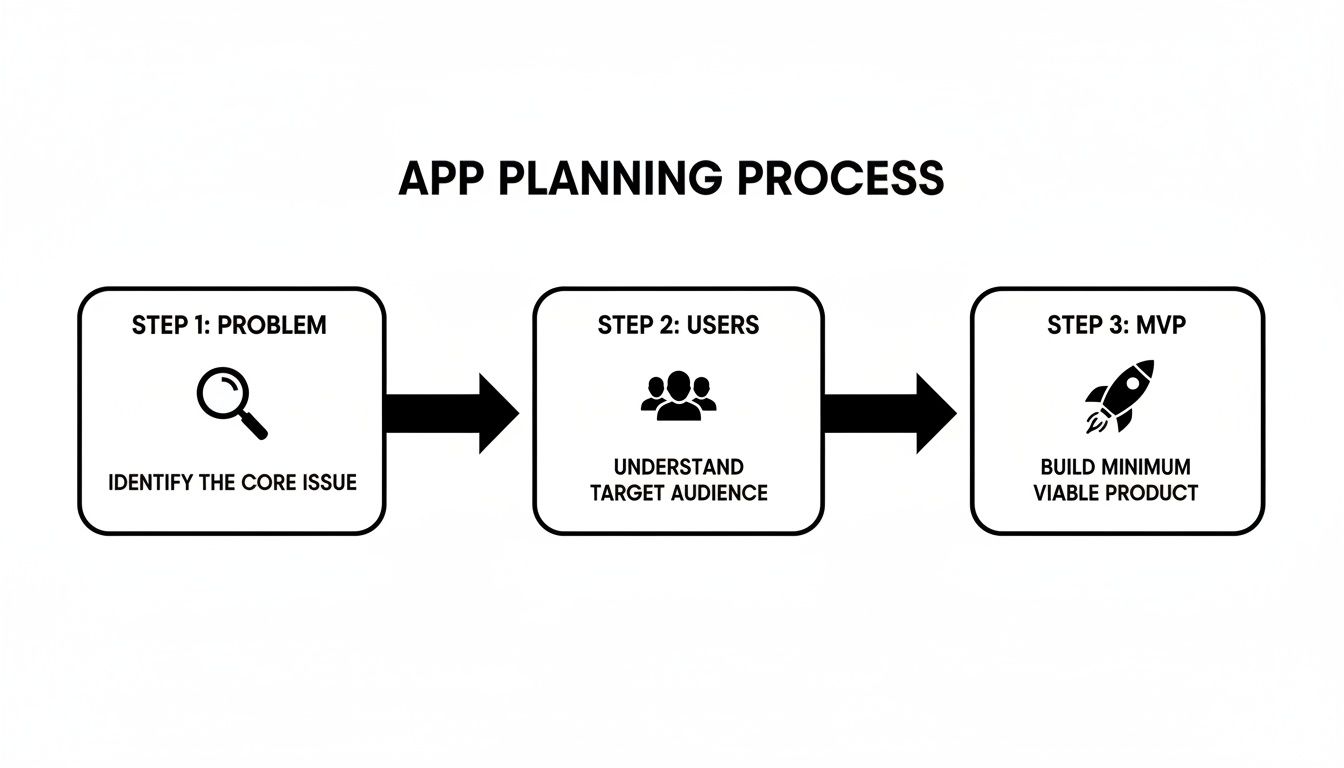
This simple flow is a great reminder that everything—your forms, logic, and automations—should tie back to solving a specific problem for a specific user. When you connect all these components, you’re not just building features; you're building a complete, efficient solution.
Integrating Your App with Other Business Tools
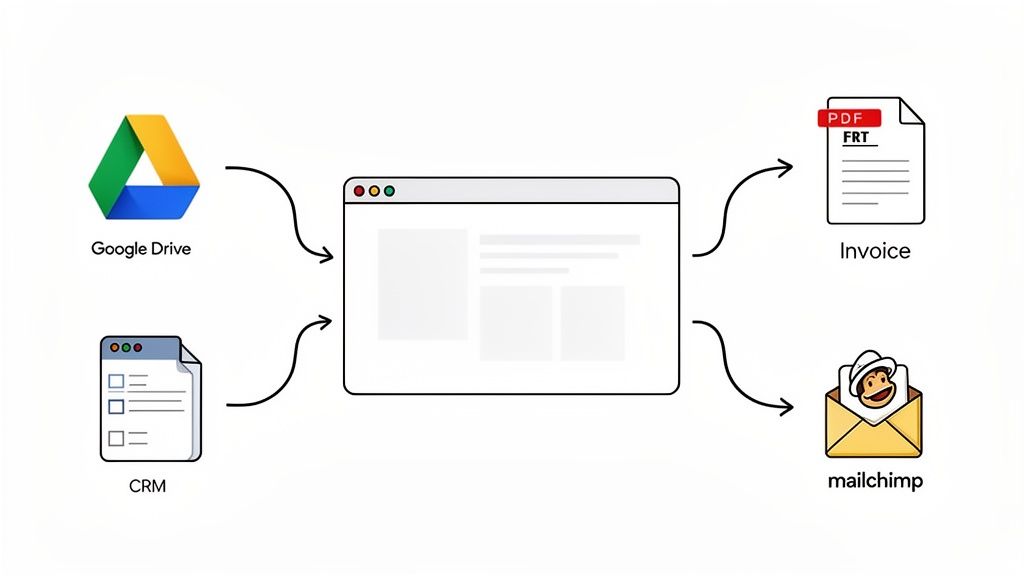
A really powerful no-code app rarely works alone. Its true strength comes from connecting with the other tools you already use every day, acting as a central hub for your business. Think of integrations as bridges that let information flow automatically between your systems.
This is what turns your app from a simple form into a core piece of your operations. By linking your app to your CRM, cloud storage, and email marketing platform, you get rid of the soul-crushing task of manual data entry. Not only does this save a ton of time, but it also slashes the risk of human error. The goal is a hands-off process where data zips exactly where it needs to go, instantly.
Connecting to Your File Storage
One of the first integrations people set up is with cloud storage. It just makes sense. Instead of downloading attachments from submissions and re-uploading them somewhere else, you can have a workflow do it for you.
Let’s say you have a client onboarding app. When a new client fills out the form and uploads their signed contract, an integration can automatically:
- Create a brand new folder in your Google Drive or Dropbox named after the client.
- Save the submitted form data as a clean PDF summary inside that folder.
- Tuck all their uploaded files neatly into that same secure folder.
This keeps everything organized, backed up, and ready for your team without anyone having to lift a finger. You can get into the nitty-gritty of setting this up in our guide to automated data integration.
Generating Documents and Pushing Data to Your CRM
Integrations can also completely change how you handle documents and customer data. So many businesses are still stuck manually filling out PDF templates for invoices, contracts, or agreements. When you're building apps without coding, this entire process can be put on autopilot.
You can easily map the fields from your no-code app directly to a PDF template. The moment a user hits "submit," the system populates the template with their info and generates a finished document.
Real-World Scenario: A freelance photographer builds a booking app. When a client submits the form, the app instantly creates a service contract with the client's name, the package they chose, and the date. It then fires it off for an e-signature.
At the same time, you can send that critical info to other platforms. For instance, a new lead captured in your app can be pushed straight to your CRM, like Salesforce or HubSpot. This means your sales team always has the latest info without any delay. You could also add new sign-ups to an email list in a tool like Mailchimp, kicking off a welcome sequence automatically. These connections are what make a truly efficient, automated system possible.
Testing, Launching, and Improving Your App
Hitting “publish” feels like the finish line, but really, it’s just the starting gun. Now the real fun begins. Once your app is live, you shift from being a builder to an optimizer. It’s all about testing, listening to feedback, and making smart tweaks based on what you see.
Before you send your app out into the wild, you need to put it through its paces. Think of it as a pre-flight check, often called user acceptance testing (UAT). It doesn't have to be a huge production. Just grab a couple of coworkers who have never seen the app and ask them to run through its main functions.
The key is to watch them like a hawk (either in person or over a screen share) and zip it. Seriously, don't help them. Every time they hesitate or look confused, you've just found gold. That confusion is your feedback. Are the instructions unclear? Is a button hard to find? Those are the friction points you’re too close to the project to see yourself.
Let Analytics Pinpoint the Problems
After that initial hands-on testing, it's time to let the data do the talking. This is where modern no-code platforms really pull their weight. Instead of just guessing where people are getting stuck, tools like Supatool give you AI-powered insights, like drop-off analytics.
This isn't just some vague percentage. It shows you the exact field or step where people are giving up. For example, your analytics might show that 73% of users bail on your client intake form the second they hit the "upload multiple documents" step.
Bingo. That’s your problem child. Is the step too confusing? Too much work? Or is it just plain broken? With that insight, you can break it down into smaller, simpler steps or just add clearer instructions.
This data-first approach takes all the guesswork out of improving your app. You’re not just changing things on a whim; you're performing targeted surgery right where it's needed most.
Sharing Your App and Keeping the Momentum
Once you’ve ironed out the initial kinks, it's time to get your app in front of your audience. You’ve got a couple of straightforward options:
- Direct Link: The simplest way is to share a direct URL. Email it, drop it in Slack, or add it to your internal wiki.
- Website Embed: For a more polished feel, you can embed the app right onto your website, making it a seamless part of the user experience.
Remember, launching is just the beginning of a cycle. You build, you test, you learn, and you improve. This constant loop is what makes no-code so powerful. And the business case is hard to argue with. No-code projects see an average 362% return on investment, and over 90% of them pay for themselves within the first year.
If you want to dig into the numbers, check out these stats on the incredible growth of the no-code market. This isn't just a trend; it’s a whole new way of building things.
Common Questions About No-Code App Building
Jumping into the world of no-code often brings up a few key questions. It's totally natural to wonder about the real power, the hard limits, and the security of these platforms before you dive in.
Let’s clear up some of the most common ones.
Can I Build a Truly Complex App Without Code?
Absolutely. While you probably won't be building the next Uber from scratch, you can create some seriously powerful business apps that solve real-world headaches. Modern no-code platforms are built for sophisticated workflows, not just simple contact forms.
Think about a multi-stage approval process for a new marketing budget. It needs conditional logic—if the amount is over $5,000, it has to go to a director. It needs automated notifications and an e-signature at the very end. That's a complex workflow, and it’s a perfect job for a tool like Supatool.
The focus is less on building a massive consumer-facing social network and more on creating solid internal tools that automate the stuff that really matters.
What Are the Real Limitations of No-Code Platforms?
The main boundaries show up when you need extreme, pixel-perfect customization or have to handle massive, public-facing scale.
If your project demands a completely unique user interface that a platform’s design tools just can't handle, or if it needs to support millions of simultaneous users, then traditional code is probably the better way to go.
Likewise, if your app's secret sauce is a proprietary algorithm you’ve developed in-house, you'll need a custom-coded solution to run it. But for the huge majority of internal tools, client portals, and workflow automation, no-code has more than enough horsepower.
The question isn't really "can no-code do it?" It's more about "is no-code the right tool for this specific job?" For most business process automation, the answer is a big yes.
How Do I Choose the Right No-Code Tool?
Start by getting crystal clear on your main goal. What are you trying to accomplish?
- Automate internal workflows? Platforms like Supatool are built for this.
- Build a customer marketplace? You'll want a tool specifically designed for that model.
- Create a mobile app for an app store? This calls for a dedicated mobile app builder.
Look for a platform that specializes in what you need to do. A few key things to check are the integrations it offers with your current software, how easy the builder is to use, its security features, and, of course, the pricing.
My advice? Always take full advantage of the free trial. There's no substitute for getting your hands dirty and seeing if the platform actually feels right before you commit.
Is My Data Secure on a No-Code Platform?
Any reputable platform puts security at the top of its list. They know businesses are trusting them with sensitive information. You should expect standard security measures like SSL encryption for all data, role-based permissions to control who sees what, and compliance with regulations like GDPR.
Before you pick a provider, make sure to read through their security and compliance documents. This is non-negotiable, especially for businesses dealing with sensitive HR or financial data. You need to be confident that the platform has strong controls to keep your information safe.
Ready to stop planning and start building? With Supatool, you can create powerful, automated workflows and internal apps in hours, not months. Sign up for free and see what you can build.