
Is Jotform GDPR Compliant? Risks, Rules and Better Options
Fast navigation
- What Is Jotform?//
- What Is GDPR and Why Does It Matters?//
- Is Jotform GDPR Compliant?//
- How Jotform Handles User Consent and Cookies?//
- Why GDPR Compliance Is Crucial for Form Builders?//
- Supatool: A GDPR-Compliant Form Builder Alternative//
- Creating GDPR-Compliant Forms: Best Practices//
- Jotform GDPR Compliance FAQs
Yes, Jotform is GDPR compliant at least on paper. It has implemented several measures to support compliance, including data encryption in transit and at rest, options for data export and deletion, and transparency around how information is processed.
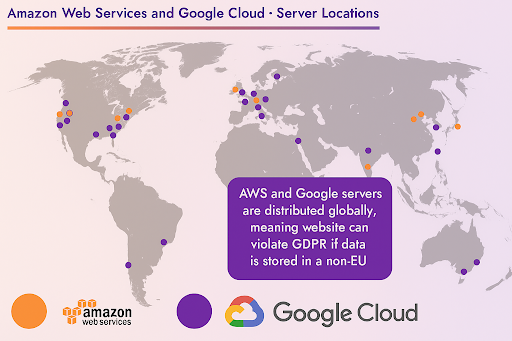
Jotform stores data on cloud infrastructure provided by AWS and Google Cloud, with servers inside and outside the EU. While both platforms support GDPR-compliant hosting, data transfers outside the EU require safeguards like Standard Contractual Clauses (SCCs).
Jotform also provides a Data Processing Agreement (DPA), which users can sign to formalize GDPR-related responsibilities.
However, it’s important to know that Jotform GDPR compliant practices depend on proper configuration. The form builder doesn’t automatically enforce GDPR settings you must manually set up consent fields, cookie notices, and data handling workflows to ensure compliance.
What Is Jotform?
Jotform is a no-code form builder that helps you create online forms for anything from surveys to sign-ups and event registrations. It’s packed with features like drag-and-drop fields, integrations with apps like Google Sheets and PayPal, and tools for collecting payments and automating workflows.
But with great data comes great responsibility. Since Jotform often handles names, emails, and other personal info, it’s crucial to know how it deals with data privacy especially under rules like GDPR.
What Is GDPR and Why Does It Matters?
The General Data Protection Regulation (GDPR) is a European law that gives people more control over their personal data and puts the responsibility on businesses to protect it.
It applies to any company, anywhere, that handles data from EU citizens. GDPR demands clear consent, secure storage, and full transparency about how data is used. You also have to give users the right to access, fix, or delete their info at any time.
For form tools like Jotform, this matters a lot. Forms collect sensitive data, and if you’re the one running the form, you’re considered the “data controller”. That means you're legally responsible for making sure your forms and how you use the data meet GDPR standards.
Is Jotform GDPR Compliant?
Yes, Jotform is GDPR compliant at least on paper. It has implemented several measures to support compliance, including data encryption in transit and at rest, options for data export and deletion, and transparency around how information is processed.
Jotform stores user data on cloud infrastructure provided by Amazon Web Services (AWS) and Google Cloud, with servers located both inside and outside the EU. While both providers offer GDPR-compliant hosting, it’s important to note that data transfers outside the EU require additional safeguards, such as Standard Contractual Clauses (SCCs).
Jotform also provides a Data Processing Agreement (DPA), which users can sign to formalize responsibilities related to GDPR compliance.
However, the tool doesn’t automatically configure forms to be GDPR-ready. The responsibility falls on you, the form owner, to set up consent fields, manage cookies, and handle data access or deletion requests properly. Jotform provides the tools, but proper usage is up to the user.
How Jotform Handles User Consent and Cookies?
Jotform GDPR compliance doesn’t include built-in cookie management or automatic consent controls. If you're embedding a form on your website, it’s your job to get user permission before collecting data.
For true compliance, you need:
- A visible cookie banner with opt-in functionality
- Clear language about what’s being collected
- Easy access to your Privacy and Cookie Policies
While Jotform supports these requirements in theory, implementation is up to you, the form owner.
Why GDPR Compliance Is Crucial for Form Builders?
Form builders often collect sensitive data, such as names, emails, health info, and payment details. That makes GDPR compliance non-negotiable.
Non-compliance can result in fines of up to €20 million or 4% of global annual revenue. But beyond penalties, there’s the loss of user trust, a cost that’s harder to measure and even harder to recover from.
Today’s users want transparency and control. If your form tool doesn’t clearly protect their privacy, completion rates can drop, and brand reputation can take a hit.
As the data controller, you’re legally responsible for how data is collected and processed. Choosing a compliant form builder and setting it up correctly is critical for protecting both your users and your business.
Supatool: A GDPR-Compliant Form Builder Alternative
If you're looking for a GDPR-compliant form builder that's secure, flexible, and built for modern teams, Supatool is a smart alternative to Jotform.
Supatool is an all-in-one, no-code automation platform that lets you create dynamic forms, workflows, and documents without writing a single line of code. Every form you build is backed by enterprise-grade security, including end-to-end encryption, audit trails, and data access controls that meet strict GDPR standards.
Built-in features like consent checkboxes, pre-designed GDPR-ready templates, and custom branding options make compliance simple and scalable. You can easily collect user permissions, limit data capture, and offer opt-outs all without relying on third-party tools or extra configurations.
Supatool also supports offline mode, real-time team collaboration, and over 100 integrations with platforms like Google Drive, Dropbox, Stripe, and more.
For companies serious about privacy, Supatool provides transparent, built-in compliance tools. Learn more by visiting our security and compliance documentation.
Creating GDPR-Compliant Forms: Best Practices
To ensure your forms are GDPR compliant, follow these tips:
- Use explicit opt-in checkboxes that are never pre-checked
- Limit data collection to only what’s necessary (data minimization)
- Link clearly to your Privacy Policy
- Provide users a way to request access or deletion of their data
When users feel informed and in control, they’re far more likely to trust your forms and your brand.
Jotform GDPR Compliance FAQs
Is Jotform Safe for Collecting Personal Data?
Yes, Jotform provides encryption and GDPR-friendly tools to help protect personal data. However, it's your responsibility to set up forms correctly to ensure full compliance and data safety.
Does Jotform automatically include a cookie banner or consent tools?
No. Jotform does not provide a built-in cookie banner or active consent tools. You are responsible for adding these features and linking to your privacy and cookie policies.
Where does Jotform store user data?
Jotform stores data on cloud platforms like AWS and Google Cloud, with servers located worldwide. If you're serving EU users, make sure proper safeguards for international data transfer are in place.
Who is responsible for GDPR compliance, the platform or the form owner?
The form owner (you) is considered the data controller under GDPR. That means you're legally responsible for how data is collected, stored, and used.
Is there a simpler alternative to Jotform for GDPR compliance?
Yes. Supatool is a no-code platform that includes built-in GDPR compliance features like consent fields, secure data storage, and audit trails, making it easier to stay compliant without extra setup.